0.1.0-alpha.1 · not open for purchase
Write the task once. Agents work it stage by stage.
You describe what should be true when the work is finished. Ligren turns that into an ordered set of stages — plan it, write it, verify it — and runs each one as its own agent with its own record. Nothing starts unless you start it, and no agent can call its own work done.
- YouWrite the task
- AgentPlan it
- AgentWrite it
- AgentVerify it
- YouMark it done
A diamond is your turn. A circle is an agent’s.
This is an alpha development preview. The core and the desktop app are at 0.1.0-alpha.1, and nothing on the capability manifest is marked available yet. The hosted team control plane is not running, so you cannot buy a plan today. The prices below are the settled public plan, published early. A private alpha is planned for September 14, 2026, by invitation.

How it works
One task, from handing it over to taking it back
Four steps. Two of them are yours, two of them are the agents’.
You
Write the task
A title, a description, and the conditions that have to hold before it counts as finished. That is the whole input.
You
Choose the shape of the work
Pick a workflow template. Ligren lays it out as an ordered list of stages so you can see exactly what will run before anything runs. This step starts no agents by itself.
Agent
Each stage runs on its own
A planning stage plans, a writing stage writes, a verifying stage checks. Each keeps its own run and its own attempt history, so a retry is recorded alongside the earlier work instead of overwriting it.
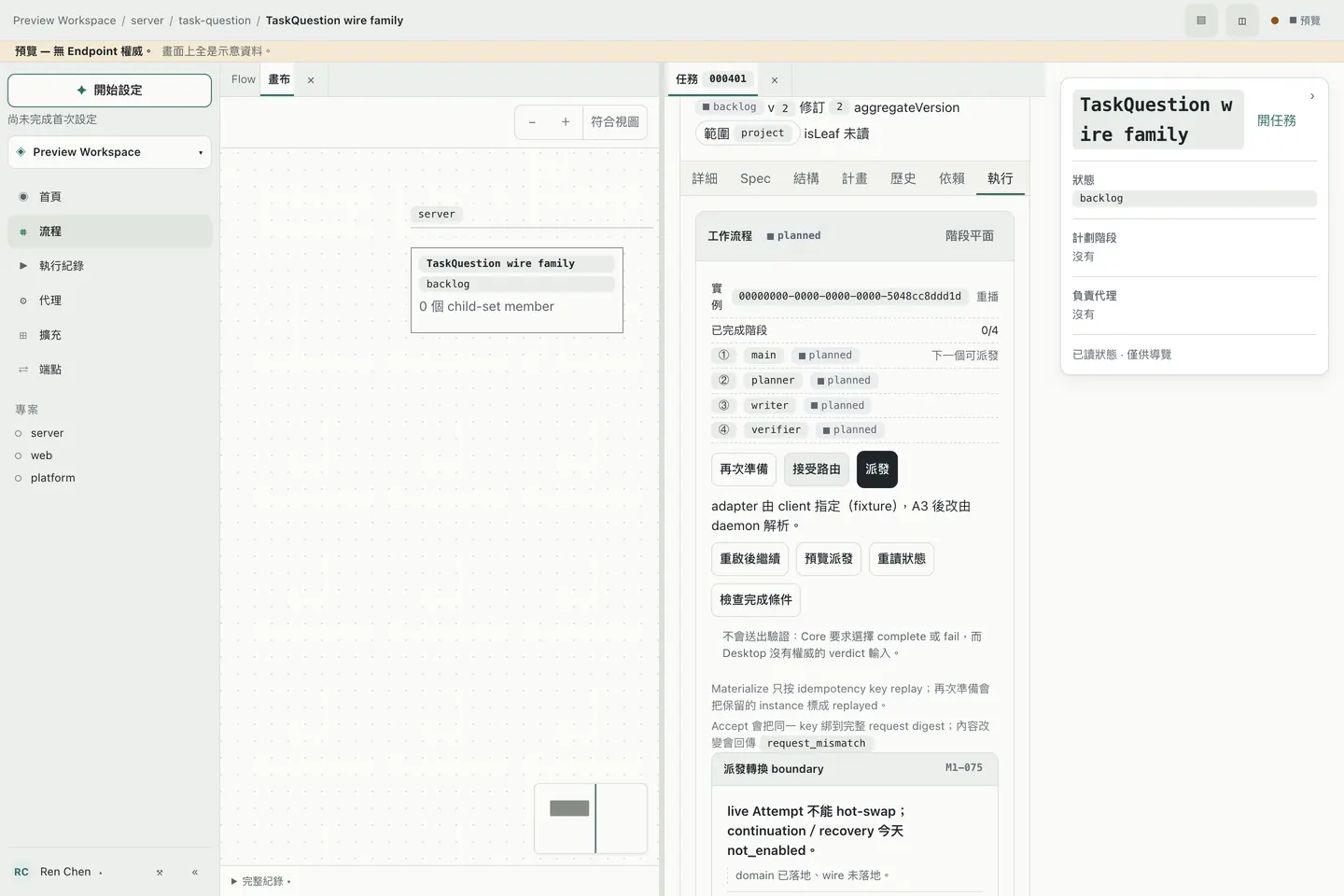
One task, opened out into its stages. Also from the app’s preview mode; the bar reads “Preview — no Endpoint authority. Everything on screen is sample data.” You
No agent gets to call its own work done
Marking the task finished is your command, and Ligren refuses it until an independent check — a different run from the one that did the writing — has returned a verdict. A worker report, a hook, model text, or an exit code of zero is never enough.

Workflows
A workflow is made of four kinds of stage
These four are the whole vocabulary. You arrange them in the editor to decide how a task gets finished.
agent
Hand it to an agent
A piece of actual work. Planning, writing and verifying are all this kind — what differs is the role assigned to it.
gate
A checkpoint
Something that has to hold before the work moves on, such as a particular output having been checked.
join
A meeting point
Branches that ran separately have to arrive here before any later stage begins.
child task
Split it off
Work that needs its own owner, its own dependencies, its own working copy, or that carries on over on another machine becomes a task in its own right.
One thing to be straight about: A gate stage today is a structural checkpoint in the template — it does not stop and wait for someone to press approve. The place a person actually decides is the completion step above, and that one is enforced.

Pricing
Four plans, and the prices are settled
Priced in US dollars, per seat, with monthly or yearly billing on every paid plan; the subscription belongs to the organization, not to a person.
Free
Freeno billing cycle
Evaluate on your own. No payment method needed.
- Up to 3 people in the organization
- 1 run at a time, shared by the whole organization
- Task cloud sync
Basic
$12USD / seat / monthor $120 / seat / year ($10 per month)
Day-to-day tier for a small team. No cap on members.
- Unlimited people in the organization
- 3 runs at a time per seat
- Task and Memory cloud sync
Pro
$25USD / seat / monthor $240 / seat / year ($20 per month)
For teams that need more work in flight at once.
- Everything in Basic
- 10 runs at a time per seat
Max
$50USD / seat / monthor $480 / seat / year ($40 per month)
The highest concurrency we sell.
- Everything in Pro
- 20 runs at a time per seat
Compare plans
| Item | Free | Basic | Pro | Max |
|---|---|---|---|---|
| People in the organization | 3 | Unlimited | Unlimited | Unlimited |
| Runs at a time | 1 (shared org-wide) | 3 per seat | 10 per seat | 20 per seat |
| Task cloud sync | Yes | Yes | Yes | Yes |
| Memory cloud sync | — | Yes | Yes | Yes |
Not included on any plan
These are switched off on every tier. We do not advertise them and we do not give a date.
- Hosted archive backup
- Enterprise SSO, SCIM, data residency
Billing and subscription terms
- Prices are in USD. Paid plans bill per seat, monthly ($12 / $25 / $50) or yearly ($120 / $240 / $480 per year, i.e. $10 / $20 / $40 per month); Free has no billing cycle.
- The subscription is held by the organization. Seat count sets that organization’s allowance.
- You can cancel your own subscription whenever you want, without contacting us and without giving a reason. Cancelling does not cut you off — you keep the plan until the end of the period you have already paid for, and it does not renew after that.
- You cannot buy a plan today. The hosted team control plane is not running, so the hosted allowance a subscription pays for cannot be delivered yet.
- No refund policy is published yet. Until one is, this site takes no paid subscriptions.
Where this is
What is actually built, and what is not
This section is here so that nothing further up the page can be read as a promise.
Real today
- Tasks, workflows, stages, runs and retry history are real tables on disk, not state held in memory.
- Done is held shut: a task cannot be marked finished until an independent check has returned a verdict.
- The run that does the checking is always a different run from the one that did the writing.
- The prices for the four tiers are settled and published on this page; every paid tier bills monthly or annually.
Not real yet
- Nothing on the desktop app’s capability manifest is marked available.
- Of the hosted control plane, only the account and permissions foundation slice is implemented; the rest is marked not started.
- The real agent adapters fail closed — only a development fixture adapter runs. So running one real task end to end is not something you can do today.
- The desktop app has only been verified on macOS x86_64, and the last complete evidence set was taken against an older core revision. Windows and Linux packaging, signing and auto-update have not been run.
- The full commercial terms and the refund policy are not published yet; the current Terms and Privacy pages are preview editions that will be replaced before paid subscriptions open.
Questions
- What am I actually buying?
- Seats in an organization. The seat count sets how much that organization can run at once and which sync features it gets. You cannot buy one today.
- Can I use it for work today?
- Not really. This is an alpha development preview and the real agent adapters are still closed. You can look at the model and the interface; do not put real work through it.
- Do you support Windows or Linux?
- Not yet. Only macOS x86_64 has been verified. Packaging and signing have not been run on the other platforms, so we do not claim them.
- How do I cancel?
- You cancel it yourself, whenever you like — no email to write, no reason to give. You keep using the plan until the end of the period you have paid for, and it does not renew after that.
- When can I subscribe?
- A private alpha is planned to begin on September 14, 2026, by invitation. Paid subscriptions come later — after the hosted control plane is generally available and the refund policy and full commercial terms are published.